A Guide to the 2024 Girl Planner-KDP Interiors Graphic
In the bustling world of self-publishing and digital entrepreneurship, discovering a versatile resource like the 2024 Girl Planner-KDP Interiors Graphic can feel like uncovering a hidden gem. This bundle isn't merely a set of images; it's a comprehensive toolkit for anyone aiming to create a polished, professional planner product for the KDP marketplace or for personal use. However, the path from download to a successful upload or print can be fraught with small, easily overlooked errors. This guide focuses on identifying those common pitfalls and offering practical, constructive advice to ensure you get the best results from your investment.
Understanding the Value of a Complete Bundle
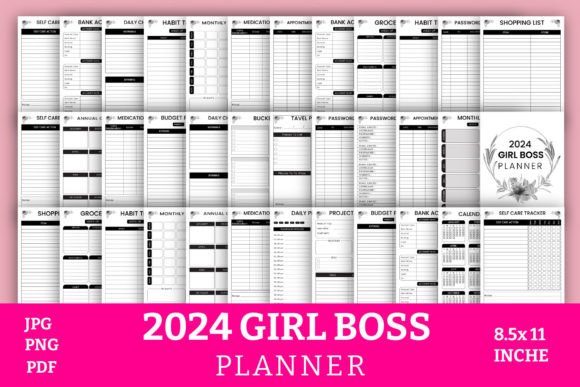
The appeal of the 2024 Girl Boss Planner Bundle Graphics lies in its completeness. With 20 different pages covering everything from annual overviews and budget planning to self-care trackers and bucket lists, it caters to a modern, multifaceted audience. It’s designed to be a functional asset, not just a decorative one. Many creators initially gravitate towards such bundles because they promise a shortcut to a professional-looking product. Yet, the most common initial mistake is viewing this as simply a "plug-and-play" set of templates without appreciating the work and customization required for a standout final product.
The Critical Download and File Assessment
Upon downloading, you receive a package typically containing a 20-page PDF, high-resolution JPG and PNG files, and often editable source files. The immediate oversight many make is failing to conduct a thorough file audit. Simply glancing at the PDF is insufficient. You must open and inspect every single file in the bundle. Check the PNG and JPG resolutions—are they truly high-resolution (300 DPI or above) as advertised for crisp printing? Verify the dimensions: the 8.5x11 inch specification is standard for KDP, but ensure all files consistently match this size to avoid cropping or scaling issues during upload. A missing step here can lead to a rejected KDP upload or a poorly printed physical planner.
A better approach is to systematically open each file type. For the PNG files, zoom in to 100% in your image viewer to check for pixelation. For the PDF, print a test page at home to assess the alignment and margins. This small upfront investment in time prevents significant frustration later.
Navigating KDP Uploads with Precision
For entrepreneurs targeting the Amazon KDP platform, the provided PDF is your primary upload file. A frequent misunderstanding is assuming that the PDF is automatically optimized for KDP's technical requirements. While many bundles are "ready to upload," you still bear the responsibility of ensuring it meets KDP's latest specifications. Common issues include incorrect bleed settings, fonts not embedded, or pages not properly trimmed.
Before you click upload, use a PDF editor or viewer to check the document properties. Confirm that all fonts are embedded to avoid substitution errors. Ensure the PDF uses a standard RGB color profile unless specifically designed for CMYK printing (most KDP interiors use RGB). Furthermore, double-check that the page count matches your product description—a 20-page interior must be exactly 20 pages, with no hidden blank pages or cover pages inadvertently included. An overlooked detail like this can cause your book to be listed incorrectly, affecting customer satisfaction and reviews.
Beyond Upload: Maximizing the Source Files
The inclusion of editable source files is a powerful, yet often underutilized, component of the 2024 Girl Planner-KDP Interiors Graphic. Beginners might stick solely to the pre-made PDF, while more experienced creators should leverage these source files for customization. The mistake is treating the bundle as a static product rather than a starting point. For instance, you might want to adjust the color scheme of the habit tracker to better match your brand, or add a unique logo to the appointment planning page.
Practical advice: if you receive Adobe Illustrator (.AI) or compatible vector files, use them to make non-destructive edits. Even if you only have high-resolution PNGs, you can overlay text or simple graphics in a program like Canva or Photoshop to create a unique variant. This differentiation is key in a marketplace filled with similar-looking planners. It transforms a generic download into a branded, distinct product that can attract a more specific audience.
Planning for Print Versus Digital Use
The bundle's specification makes it suitable for both print-on-demand through KDP and direct personal printing. A crucial decision point is defining your end use from the start. A common error is preparing files for KDP upload when your actual intent is to print them locally for personal use or to sell as physical copies at events. The requirements differ significantly.
For personal printing, the high-resolution JPGs become your most valuable assets. However, directly printing 20 individual JPGs is inefficient. A better approach is to use the PDF or compile the JPGs into a single, ordered PDF yourself, ensuring page continuity. Always perform a test print of a complex page, like the project planner with many lines and boxes, to check your printer's ink alignment and clarity. For professional bulk printing, communicate with your printer early, providing them with the exact file types they prefer—often the PDF is best, but they may require specific color profile adjustments.
The Content Alignment Check
Each page in the bundle, from the medication tracker to the travel planner, serves a specific function. An overlooked detail is failing to align the planner's content with your target audience's actual needs. For example, if you're marketing this to young entrepreneurs, the "Bank Accounts" and "Budget Planning" pages are highlights. But if your audience leans more towards lifestyle and wellness, the "Self Care Tracker" and "Bucket List" should be featured prominently in your product description and sample images.
Before finalizing your product, make a list of all 20 pages and assess their relevance. Consider if any page might be confusing or unnecessary for your niche—in which case, the editable files allow you to modify or replace it. This content-focused evaluation ensures your final planner isn't just technically correct, but also commercially viable and genuinely useful to the end user.
Final Steps Before Publication
Your journey with the 2024 Girl Boss Planner Bundle Graphics culminates in publication or use. The last set of mistakes often revolves around presentation and communication. For KDP sellers, the product listing is paramount. Using generic descriptions like "includes 20 pages" is a missed opportunity. Instead, craft a description that narrates the user's experience, mentioning specific pages like the "Monthly Goals" and "Password Tracker" to demonstrate practical value. Use the high-resolution PNGs you downloaded to create compelling, clear preview images for your KDP listing.
For all users, a final, holistic review is essential. Step back and view the entire planner as a cohesive system. Does the flow from the annual overview to the monthly planner to the daily checklist make logical sense? Are the design elements consistent across all pages, providing a unified aesthetic? This macro-view ensures the planner functions as an integrated tool, enhancing its usability and perceived quality. By avoiding these common pitfalls and applying this layered, attentive approach, you transform a downloadable graphic bundle into a successful, satisfying project that meets your creative or entrepreneurial goals.